If you do any gaming on MacOS, you’ll notice very frequent ping spikes. This is caused by Apple Wireless Direct Link (AWDL) interface switching the wifi channels for scanning nearby devices.
Apple uses this interface for AirDrop, Handoff and continuity features.
The wifi interface hops on to the AWDL channels every few seconds.
Fortunately, the fix is quite simple. Run this in the terminal:
sudo ifconfig awdl0 downHowever, MacOS in true timid fashion, infantilizing it’s own users, will bring up the interface again after some time.
There are a lot of people who have created full blown applications (https://github.com/jamestut/awdlkiller, https://github.com/oliverames/ping-warden) which live in the menubar (which is already overcrowded with icons, thanks to Apple’s insistence to not provide a better UX for that).
A better way is to create an automation in the shortcuts app. This saves you not having to install yet another app to fix MacOS’s shortcomings.
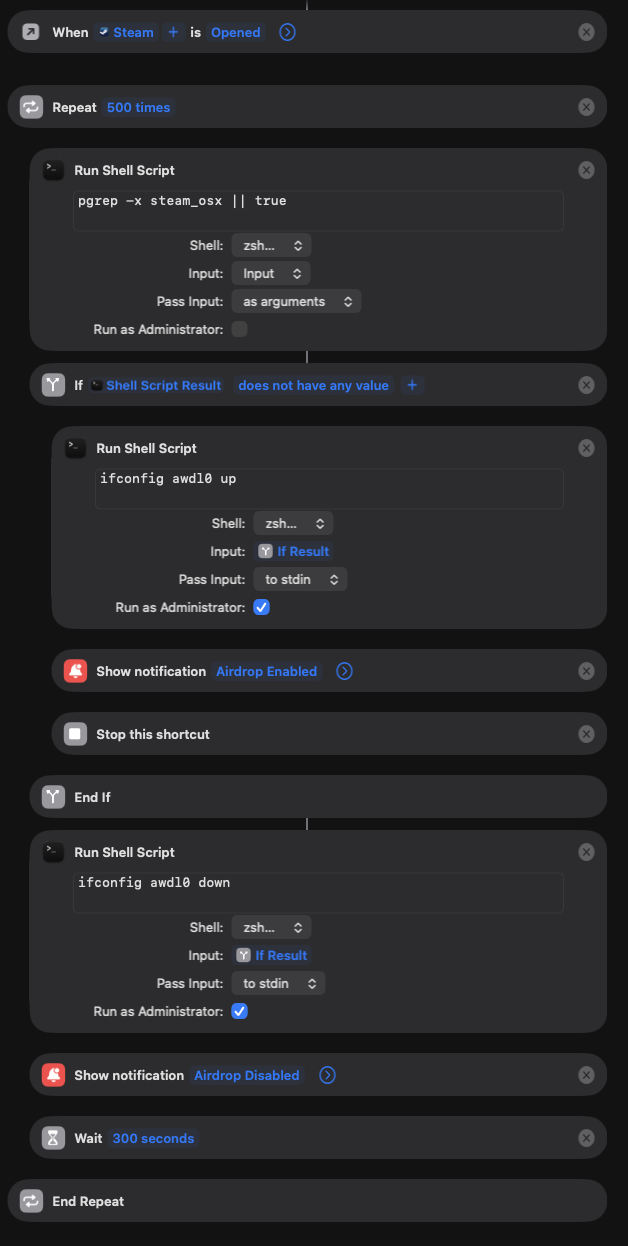
You can directly download the shortcut from here – https://www.icloud.com/shortcuts/c6e936dc42bc4397857e04f87a37165f
Note: While AWDL is down, AirDrop, AirPlay, Handoff and Universal Control won’t work. To turn it back on, run in terminal:
sudo ifconfig awdl0 up